
POWERSCADA | WEB SCADA
PowerScada SCADA Software
Design screens, connect equipment and run the plant, all in the browser. A SCADA platform for factory production lines and building automation alike.
PowerScada (PS SCADA for short) is the web-based SCADA platform developed in-house by Run An Technology.
We decided to develop our own SCADA because we kept running into the same problems on site: high license fees, communication drivers sold separately, and downtime every time a screen had to be changed. PowerScada needs no client software and no programming; screens are built by drag and drop. Multi-protocol communication, alarms, trends, reports, scripting and video are all built in, it deploys on a single Windows industrial PC, and it runs normally on sites with no internet connection.
- Developed in Taiwan
- Direct support from the local development team
- 100+
- Built-in industrial vector graphics
- 8 languages
- Switch the whole interface with a single tag
- Offline ready
- Windows industrial PC, no internet needed
HIGHLIGHTS
Highlights
From screen design and device communication to on-site deployment, everything a SCADA needs is integrated in one platform, with no external modules to buy.
The browser is both the editor and the runtime
No software to install and no programming: build screens by drag and drop. Online edits are WYSIWYG and take effect the moment you click Deploy, with no downtime on site.
One system for many devices
Modbus, Mitsubishi MC, KEYENCE KV, Vigor, BACnet and OPC UA are all built in. PowerScada can also act as a Modbus TCP and OPC UA server to feed supervisory systems.
Rich industrial components plus 100+ built-in graphics
Gauges, indicator lights, piping, pumps, valves, tanks, seven-segment displays, barcodes, 3D, video, VNC, tables, trends, alarm panels and more, plus over a hundred industrial vector graphics, so there is nothing extra to buy.
Alarms, trends, reports and scheduling built in
Rules maintained in tables, Excel round-trips, compressed trend archiving and automatic reports from Excel templates, with no add-on modules to purchase.
C# scripting engine
The same editor as VS Code. Read and write tags, call APIs, work with files and share global functions. Write code only when you need advanced logic.
Easy to deploy on site
Runs on a Windows industrial PC, fully offline, with OTA remote updates, partial sync while running, device discovery and a favorites list. PSHMI, which runs the whole SCADA directly on an HMI, is coming next.
EDITOR
The Editor
After login the interface is divided into eight areas: drag components from the left onto the canvas, set properties and pages on the right, and click Deploy to go live immediately.
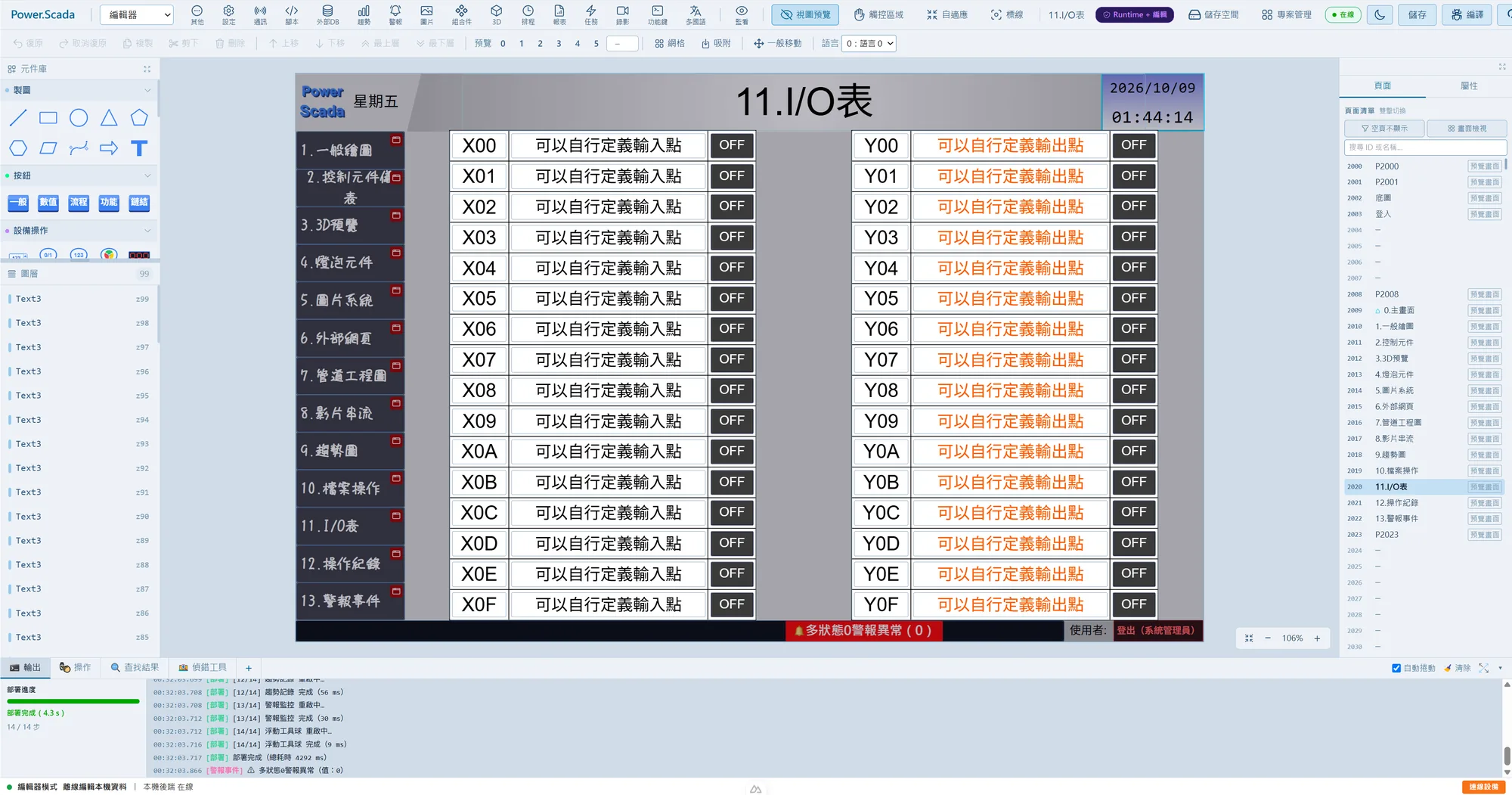
- 1
Top bar
Switch between editor and runtime; open the management panels for communication, scripts, trends, alarms, schedules, reports and languages. Preview, theme, save and deploy are on the right.
- 2
Toolbar
Undo/redo, copy/cut/delete, layer order, state preview 0 to 5, grid, snapping and language preview.
- 3
Component library
Drawing, buttons, equipment operation, gauges, media, engineering, trends, alarms and other categories. Drag a component onto the canvas to use it.
- 4
Layers
The component list for the current page, showing the number of components and their stacking order. Click to select.
- 5
Canvas
WYSIWYG editing: zoom, pan, marquee selection, align, distribute, group, grid snapping and arrow-key nudging.
- 6
Pages / Properties
Double-click a page to switch; right-click to move, swap or duplicate a whole page. Select a component to adjust every parameter in the properties panel.
- 7
Bottom panel
Deployment progress with step timings, the operation log, search results and a debug tool that shows communication traffic in hexadecimal. Can be popped out into its own window.
- 8
Status bar
Editor mode, local backend connection status and the devices currently connected.
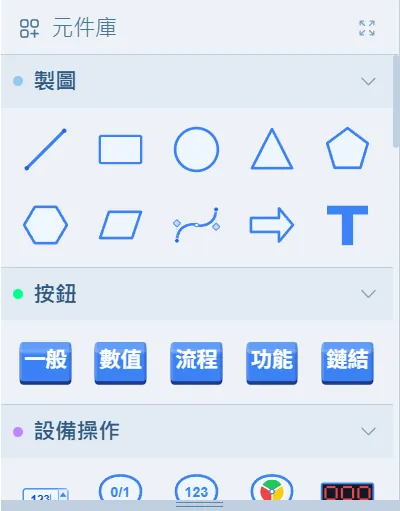
Component library
Grouped into drawing, buttons, equipment operation, gauges, media and engineering. Expand a group and drag straight onto the canvas; components of the same type can be multi-selected and edited together.
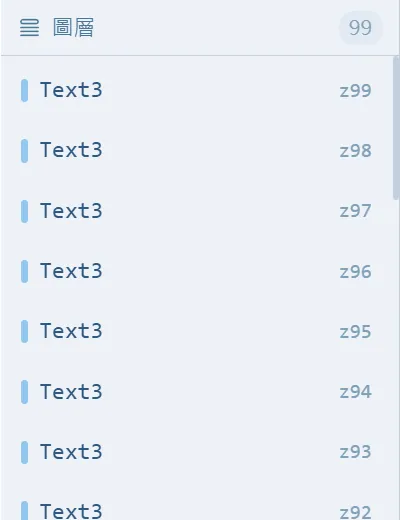
Layer list
Complex screens with hundreds of components stay manageable: Ctrl+G to group, isolate-and-edit in place, and Ctrl+F to search tag bindings across the whole project.
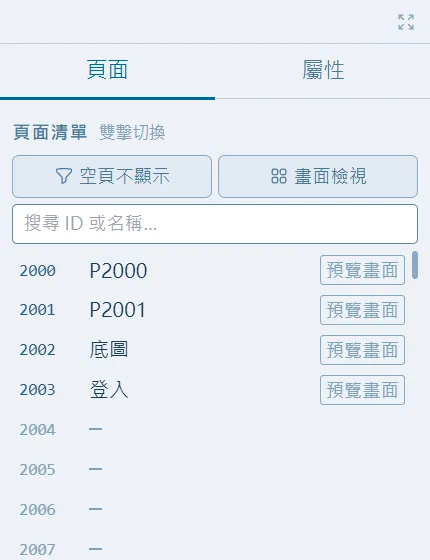
Page list
Multiple pages and popup pages. When pages are moved, swapped or duplicated, navigation buttons and background images update automatically, so links never break when pages are renumbered later.
SHOWCASE
Showcase
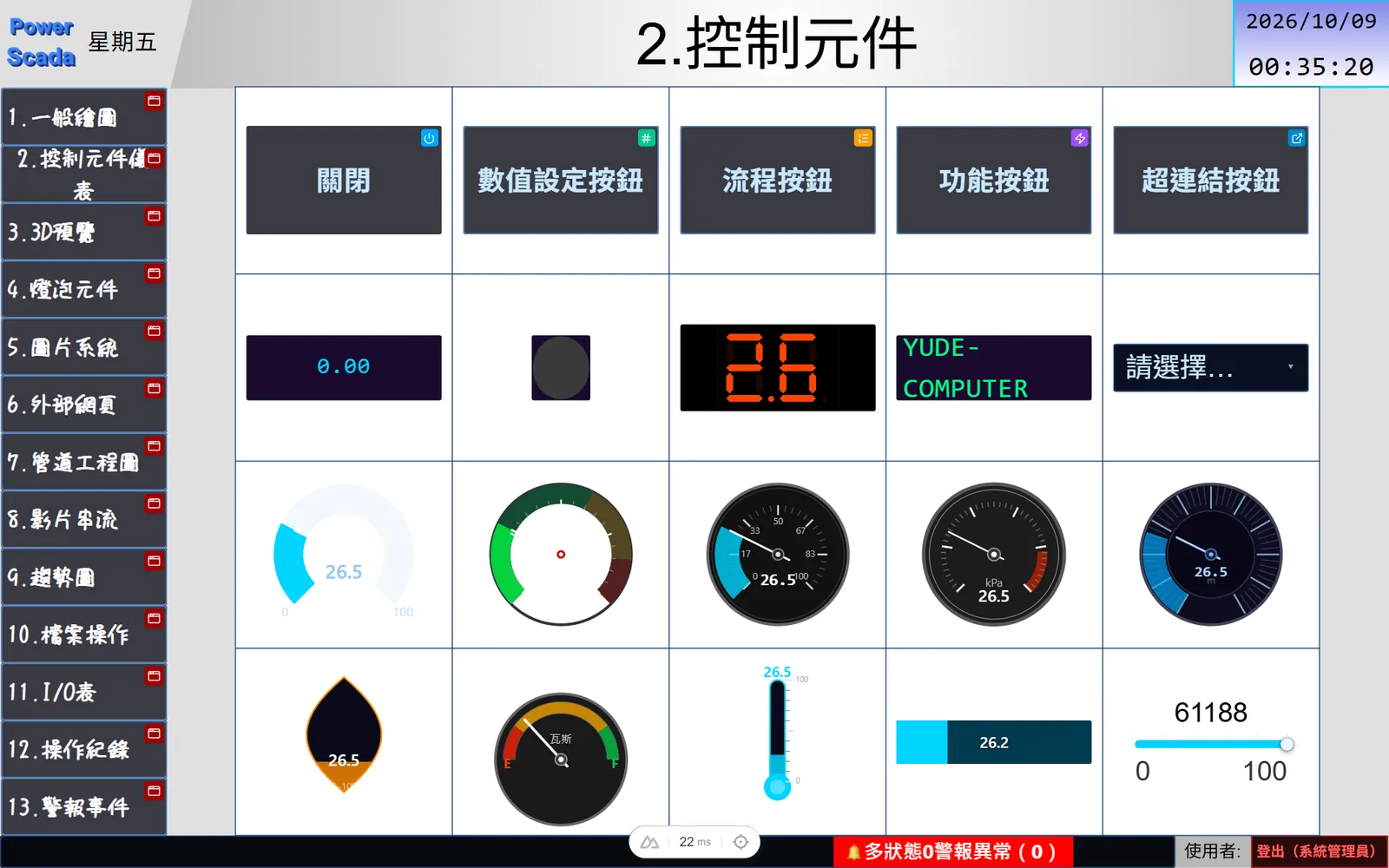
A complete set of industrial components, with 100+ graphics ready to use
Gauges, seven-segment displays, multi-state indicators, buttons, drop-downs, sliders, barcodes, images, video streams, VNC, 3D models, embedded web pages, SQL tables, alarm panels and trend charts, all available by drag and drop. More than a hundred SVG vector graphics (pumps, valves, tanks, fans and more) are built in, so there is no graphics library to buy.
- Gauges: round, semicircular, thermometer, bar, level and dial styles
- Buttons: standard, value write, sequence, function and hyperlink, in three 3D styles
- QR and 1D barcodes (including GS1), seven-segment displays, virtual keyboard
- Font designer, global font upload, gradient fills
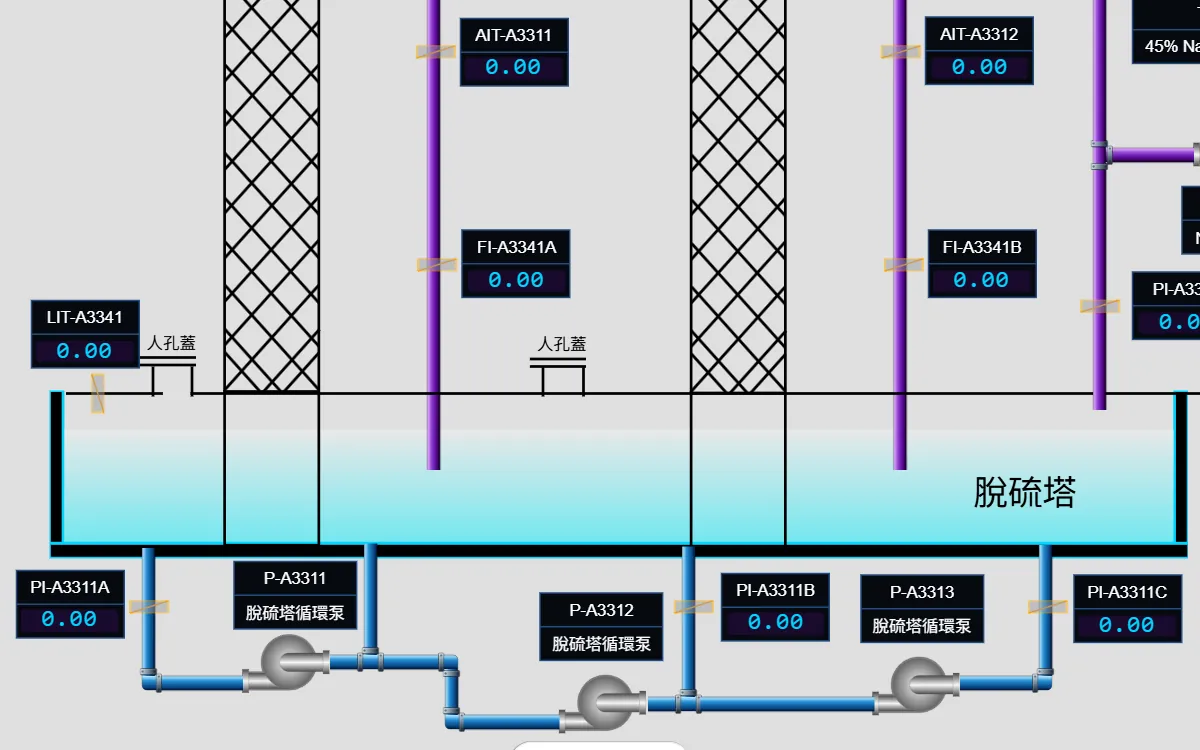
Build piping diagrams fast
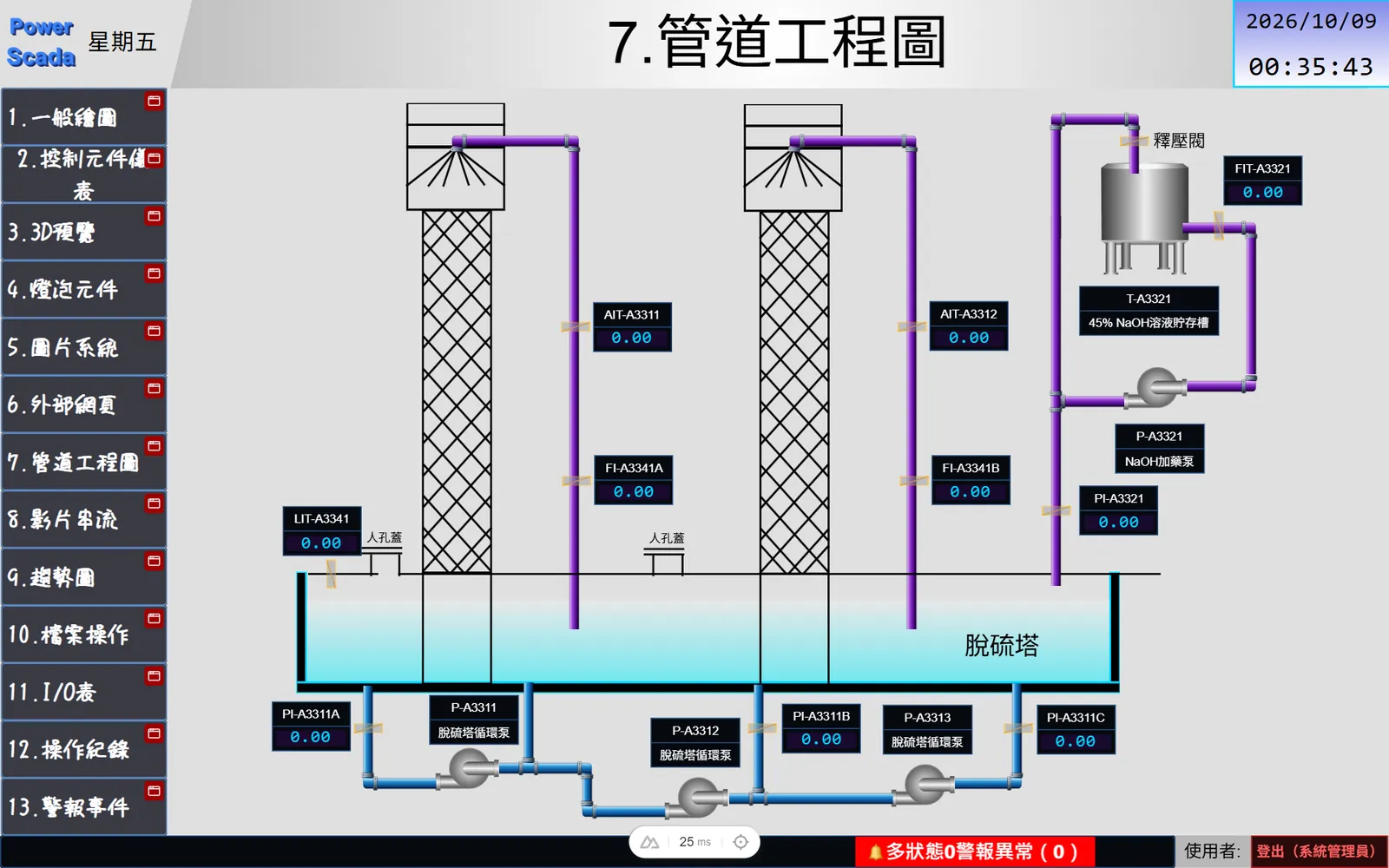
Quick piping mode: click a start point and drag toward the target; straight runs extend automatically and corners join with elbows. Water, fire protection, air, steam, chemical and wastewater pipes each have their own color scheme, with flow animation. Even a complete process piping diagram such as a desulfurization tower can be finished quickly.
- Straight runs extend automatically, corners join with elbows
- Color schemes for many pipe types, with flow animation
- Pumps, valves and tanks from the vector library
- Any project resolution; components scale proportionally when it changes
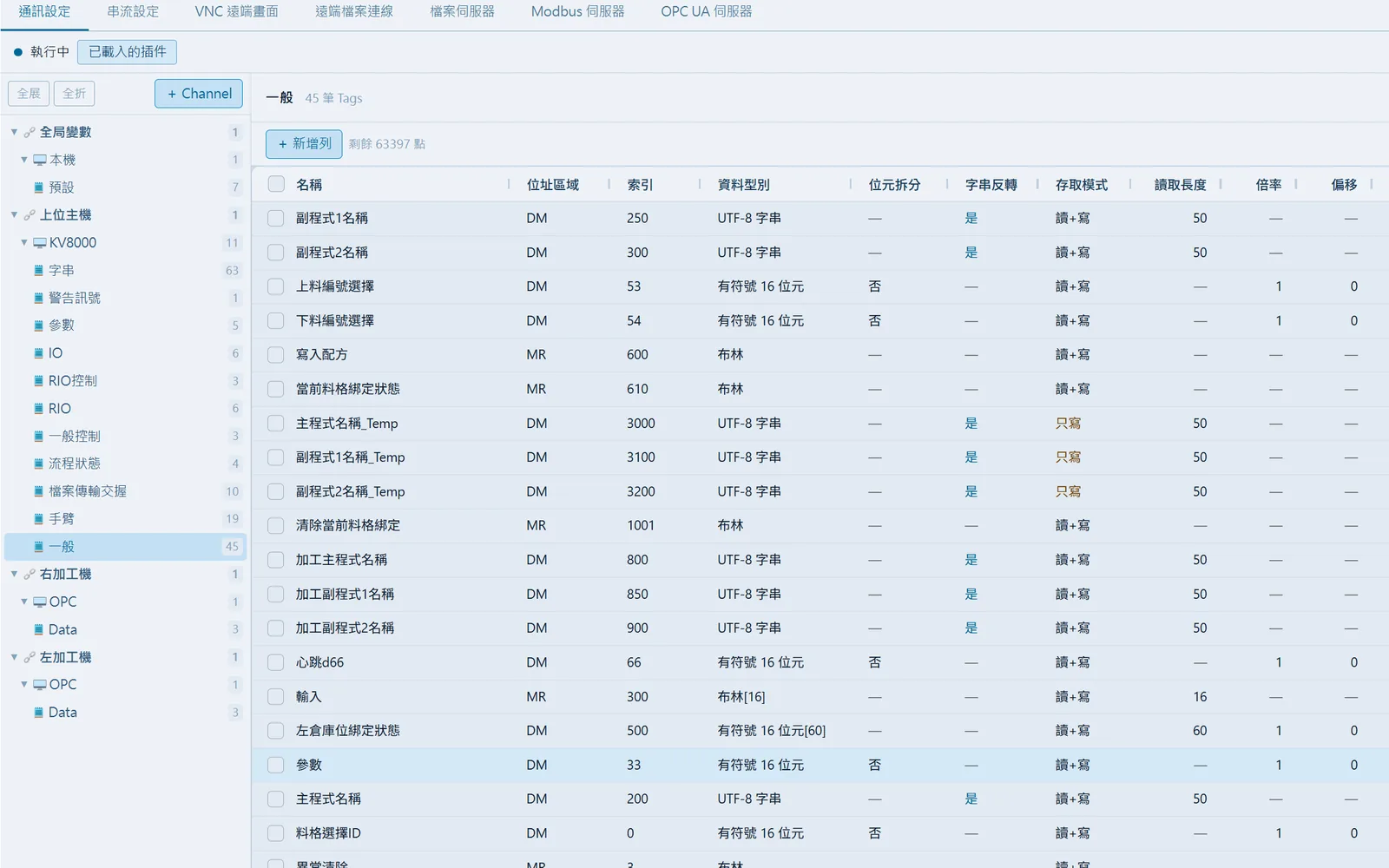
Communication configured in tables
A four-level structure of channels, devices, tables and tags, with tags edited in a table: bulk creation, paste from Excel, import and export, bit splitting, arrays, scale and offset. One project can connect to Modbus, Mitsubishi, KEYENCE, Vigor, BACnet and OPC UA devices from different brands at the same time.
- Bulk tag creation, Excel import and export
- Bit splitting (bits 0 to 15), arrays, scale and offset, read/write modes
- BACnet device scanning, OPC UA node browsing and import
- Communication test and pass-through tools, automatic reconnection
Alarms, trends, reports and scheduling, no add-on modules required
Alarm rules are maintained in a table, with the trigger message, color style, page jump and acknowledgment state all set on the same row. Trend sampling periods are set per table, and raw data and compressed statistics have separate retention periods. Fill variables into an Excel template and reports are generated automatically on schedule.
- Alarm panel, alarm Gantt chart and fault banner
- Compressed trend archiving; export to Excel as raw or aggregated data
- Excel template reports on daily, weekly or cron schedules
- Background tasks: when a tag condition is met, jump to a page, open a popup, play an alert sound or start recording
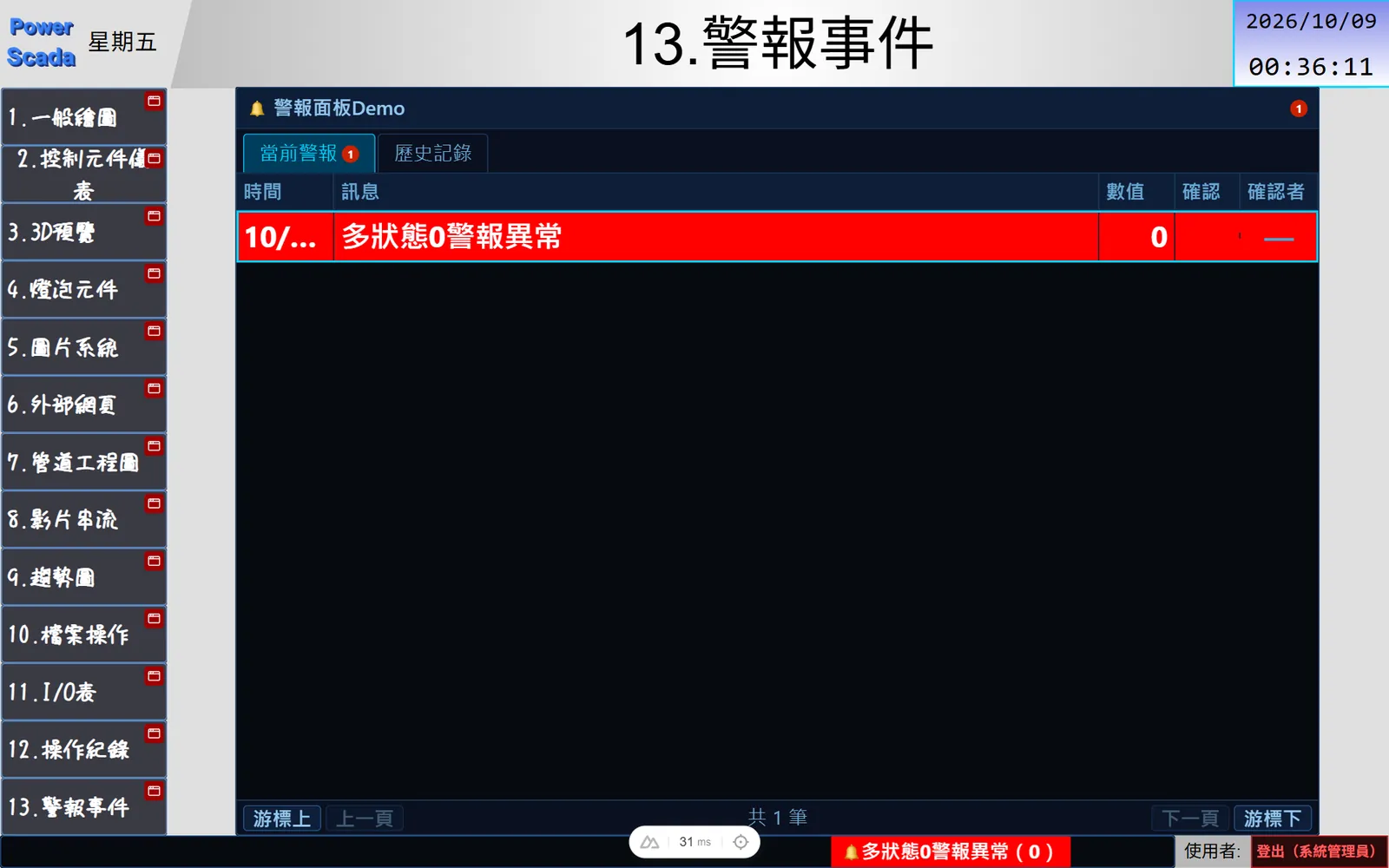
Write C# when you need advanced logic
A built-in C# scripting engine with the same editor as VS Code, including syntax highlighting, auto-completion and an insert helper. Scripts can read and write any tag, call HTTP APIs, work with local and remote files, open popups and generate reports, and global scripts share variables and functions.
- Timed loops, manual triggers and global scripts
- Typed tag reads and safe conversions
- HTTP, SFTP / SCP / WebDAV file operations
- Function keys F1 to F12 can be bound directly to scripts
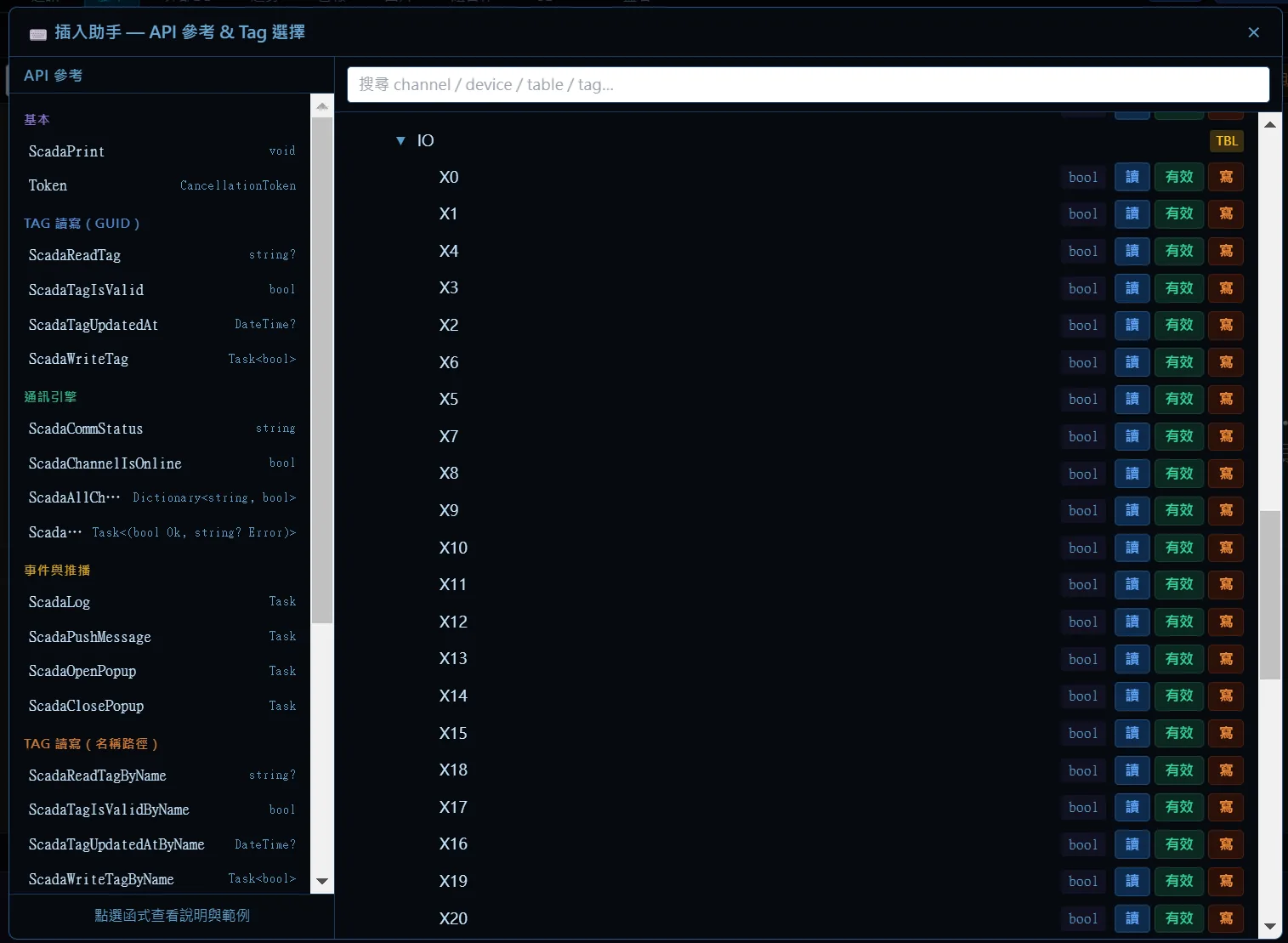
Cameras and remote desktops on the same screen
RTSP / HTTP camera streams, event-triggered recording (N seconds before and after the trigger) and VNC remote screens (operate an HMI or PC directly inside the SCADA screen) are all provided as components, so you can watch live video while monitoring the data.
- RTSP, HTTP snapshots, MJPEG and video file playback
- Event-triggered recording and clip playback
- VNC remote viewing and control
- 3D model and embedded web page components
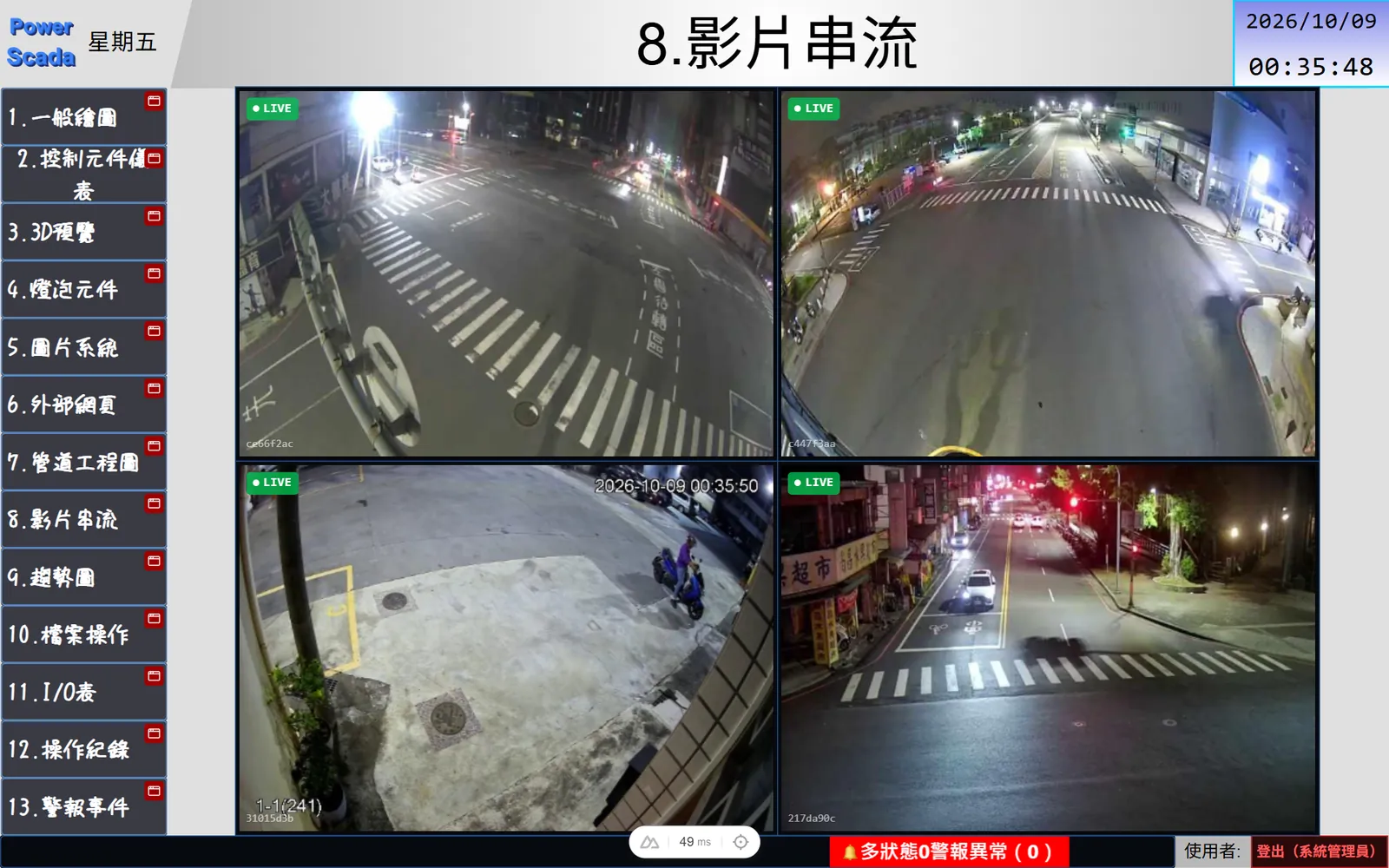
Edit online, what you see is what you get
Make changes while the system is running: the screen in the editor is the screen on site, and it goes live the moment you click Deploy, with no downtime and no reinstallation. Deployment progress and step timings are visible. Edits made while running sync only the changed sections, so the whole project never has to be redeployed.
- Windows installer; one industrial PC is enough
- Runs fully offline, with OTA remote updates
- Edit while running, partial sync
- Encrypted project export, backup and restore
- Planned: PSHMI, running the whole SCADA directly on an HMI
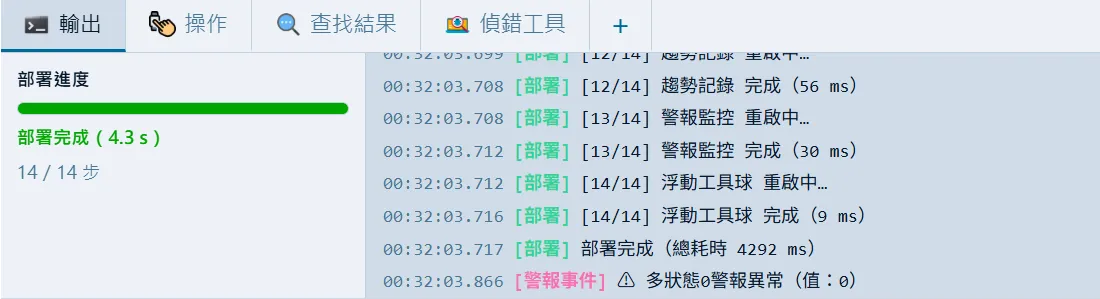
MORE FEATURES
More built-in capabilities
Every part of day-to-day plant operation has a matching feature, so there is no need to stitch together several tools.
One-tag language switching
8 languages. A single tag sets the current language for the PLC, buttons and scripts alike; strings can be exported to Excel for translation.
Touch and virtual keyboard
Touch-optimized, with English, Zhuyin and Pinyin keyboards, long press, touch sounds and buzzer, popup pages and screensaver.
Access control and login
Admin, Engineer and Operator roles plus per-component levels, login and logout components, and backend write APIs that require authentication.
Runtime redirection and embedding
Switch every screen on site to a given page from the editor; a pure display route can be embedded in MES, ERP or portal sites via iframe.
Composite components
Reusable, parameterized component groups with their own management panel. Import and export them across projects, and turn frequently used screens into standard composites.
Data storage and integration
Trends, alarms and operation logs can be stored in PostgreSQL, SQLite or an external database; the SQL table component can query external databases.
Files and remote access
FTP file server, SFTP / SCP / WebDAV remote files and USB drive file listing.
AI assistant interface
A built-in MCP service lets an AI assistant read the project, build screens, configure communication and alarms, and check system status.
Project protection and auditing
Encrypted exports, project lock, operation log and a hardware status window (CPU, memory and disk).
PROTOCOLS
Protocol support
Modbus, Mitsubishi MC, KEYENCE KV, Vigor, BACnet and OPC UA drivers are built in: connect as soon as installation is complete, with no communication modules to buy.
Modbus TCP
Ethernet; can act as a server
- Client
- Server
- Parallel connections
Modbus RTU
RS-232 / RS-485 serial
- RS-485
- RS-232
- Serial port mapping
Mitsubishi MC 3E
FX5 / Q / iQ-R series
- FX5
- Q series
- iQ-R
KEYENCE KV
KV-3000 to KV-8000
- KV-3000
- KV-5000
- KV-7000
- KV-8000
Vigor
VS TCP, VB / VH RTU
- VS
- VB
- VH
BACnet/IP
Building equipment and point scanning
- BACnet/IP
- Device scan
- Point scan
BACnet MS/TP
RS-485 bus
- MS/TP
- RS-485
OPC UA
Client and server (per license)
- Subscriptions
- Certificate trust
- Node import
- Server
Act as a server for supervisory systems
PowerScada can run as a Modbus TCP server and an OPC UA server, providing field data to MES, BMS and other supervisory systems.
- Modbus TCP Server
- OPC UA Server
Device discovery
BACnet device and point scanning, OPC UA node browsing and import, so addresses never have to be typed in one by one.
- BACnet scan
- OPC UA browse
- Favorites list
Tag tables
Bulk creation, paste from Excel, import and export, bit splitting, arrays (bindable to a single element), scale and offset, UTF-8 strings.
- Bulk creation
- Excel import/export
- Bit splitting
- Arrays
Communication tools
Send raw packets on a running channel and inspect the response. The pass-through tool lets the PLC vendor's software reach field devices through the SCADA host. Automatic reconnection and a fault banner are included.
- Communication test
- Pass-through
- Auto reconnect
LICENSE
Licensing scaled to the size of the site
Point-based licensing with feature flags: the tag count is set by the license and advanced features are added only when needed, so a small site never has to buy the full suite. Actual quantities and items depend on the license; we quote according to the size of the site when you contact us.
- Point-based: the tag limit is set by the license
- Feature flags: add advanced features as needed
- Project protection password and encrypted exports
- Trial version available, so you can evaluate before you commit
INCLUDED
Included
- Browser editor and runtime
- Modbus, Mitsubishi MC, KEYENCE KV, Vigor and BACnet communication
- Alarms, trends, reports, schedules and background tasks
- C# scripting engine
- Multi-language, access control and operation log
ADD-ONS
Optional add-ons
- Built-in vector graphics library
- OPC UA client and server
- VNC remote screens
- Event-triggered recording
- MCP AI assistant interface
- Additional server instances
Actual items and quantities depend on the license and will be explained when you contact us.
FAQ
FAQ
Web-based SCADA, offline deployment, PLC communication: the questions customers ask most often.
What is web-based SCADA?
A monitoring system that uses the browser as its human-machine interface. Operators install nothing: open the URL on a PC, tablet or phone and the full SCADA screen is there. With PowerScada, screen design, device communication and runtime operation all happen in the browser, and it works for factory lines, fire protection and building automation alike.
Which PLCs and protocols does PowerScada support?
Modbus TCP / RTU, Mitsubishi MC 3E (FX5, Q and iQ-R series), KEYENCE KV series (KV-3000 to KV-8000), Vigor (VS TCP, VB / VH RTU), BACnet/IP, BACnet MS/TP and OPC UA client. It can also act as a Modbus TCP server and an OPC UA server to pass data up to supervisory systems.
Do I need to write code?
No. Screens are built by drag and drop, communication is configured in tables, and alarms, trends, reports and schedules are all set up by configuration. When you need advanced logic, use the built-in C# scripting with the same editor as VS Code, including auto-completion and an insert helper.
Does it run without an internet connection?
Yes. The front end works fully offline and the back end is a single executable with icons and fonts built in. A single Windows industrial PC is all it needs, with no external network connection.
Do I have to stop the system to change a screen?
No. Screens can be edited while the system is running, WYSIWYG, and go live as soon as you click Deploy. Edits made while running sync only the changed sections rather than redeploying the whole project, which greatly shortens on-site maintenance time.
Can several people view it at the same time?
Yes. The runtime is a web server, so PCs, tablets and phones can open different screens at the same time. Access control has three roles, Admin, Engineer and Operator, and the number of concurrent connections is set by the license.
Where is PowerScada a good fit?
Building HVAC, lighting and access control, factory equipment and production lines, energy management and control room displays. Our team has deployed it for building automation equipment management, production line monitoring, real-time fire monitoring and alarms, and facility environments where many PLCs have to be integrated.
How do I get started? Is there a trial?
Contact us directly and we can arrange a demonstration, an evaluation and a trial version. A complete manual is provided, and installation to go-live usually takes only a few hours on the Windows platform.
Can it run directly on an HMI panel?
PowerScada currently deploys on a Windows industrial PC, and the runtime screens can be opened in a browser on any touch HMI, tablet or PC. PSHMI, which runs the whole SCADA directly on an HMI without a separate computer, is coming next.
Is PowerScada developed in Taiwan?
Yes. It is developed in-house by the Run An Technology team, which has more than five years of hands-on automation experience. Compared with general-purpose SCADA from overseas, PowerScada is designed for the needs of local sites, with a Traditional Chinese interface, local service in Taiwan and support straight from the development team.
Are PowerScada, PS SCADA and Run An SCADA the same product?
Yes. PowerScada is the official name of the SCADA platform developed in-house by Run An Technology. Our team and customers usually shorten it to PS SCADA, and some simply call it Run An SCADA. Whichever name is used, it refers to the same web-based SCADA platform that is designed and run in the browser.
CONTACT
Contact and trial
For a product demonstration, site evaluation or trial version, call or email us and the development team will reply directly.
RUN AN TECHNOLOGY CO., LTD.
4F., No. 139, Sec. 3, Zhonghua E. Rd., East Dist., Tainan City 701, Taiwan
- Phone
- 0968-909-922
- [email protected]